
Auto-Restart Bot for Amazon with Real-Time Setup
Overview
The software is designed to automate tasks on Amazon, particularly those involving bot operations such as picking up blocks within specified time windows. It supports automatic restarts when errors occur or connections are lost, ensuring continuous operation without manual intervention. The tool allows users to set custom speeds for bot performance and define precise criteria for block selection based on station and hour windows. This makes it suitable for users managing high-frequency or time-sensitive Amazon workflows, such as inventory monitoring or rapid order processing.
Target users include professionals and power users engaged in e-commerce automation, especially those relying on consistent, real-time execution. The software was developed by FlexBot, a company focused on automation solutions for online marketplaces. It runs on both Windows and Mac platforms, making it accessible to a broad user base. Real-world applications include streamlining repetitive tasks during peak sales periods or maintaining uninterrupted operation during critical order fulfillment windows.
While the developer did not provide additional system requirements, the application is available as a desktop tool with a 150MB installation size. The latest version, 1.7.1, includes fixes for visibility issues, logical filters, and hour section bugs, along with enhanced notification friendliness and real-time setup criteria. The software is offered at no cost, aligning with a free-to-use model.
Key Features & Capabilities
- Automatic Restart on Errors – The software automatically restarts the bot when errors occur or connection losses are detected, minimizing downtime and maintaining workflow continuity.
- Customizable Bot Speed – Users can adjust the bot’s operational speed to match their workflow needs, enabling faster or more controlled execution based on task urgency.
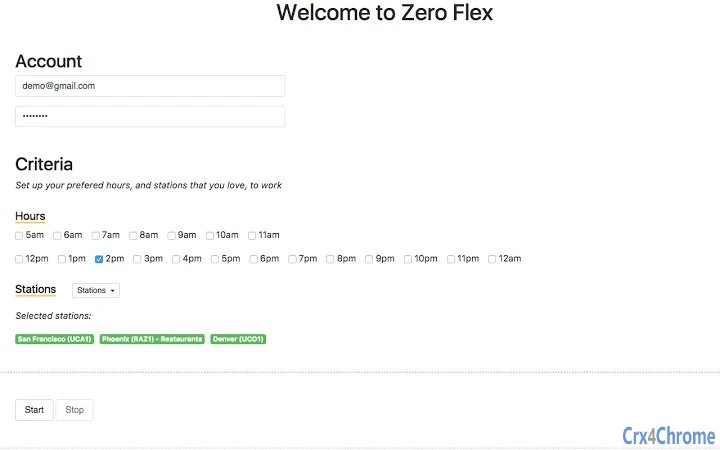
- Real-Time Setup Criteria – Allows users to define dynamic criteria for selecting blocks, including station-specific and hour-based conditions, ensuring precise automation.
- Auto-Update via Homepage – The tool can update itself automatically through the home page, ensuring users always have access to the latest version without manual intervention.
- Secure Information Handling – Sensitive data related to Amazon operations is hidden from view, reducing the risk of exposure during use.
- Block Selection by Station and Hour Window – Enables users to target specific blocks based on station and time windows, ideal for time-critical tasks.
- Improved Notification System – Notifications are now more user-friendly, offering clearer feedback on bot status and operational events.
These features are particularly useful in scenarios where uninterrupted operation and precise timing are essential. For example, during flash sales or limited-time inventory drops, users can set the bot to activate at a specific hour and target blocks from a designated station. The ability to auto-restart ensures the process continues even if temporary disruptions occur. The real-time setup criteria allow for dynamic adjustments without restarting the entire workflow.
User Interface, Workflow & Performance
The software features a streamlined interface focused on automation control and real-time monitoring. Navigation is designed around task configuration, with clear sections for setting up bot speed, selection criteria, and monitoring status. Users can define station and hour-based parameters through intuitive input fields, allowing for quick setup and adjustment.
Workflow efficiency is enhanced by the integration of auto-restart and auto-update features, reducing manual oversight. The application maintains a stable operation during continuous use, though exact performance details were not specified. The developer did not provide resource usage data, so CPU and RAM behavior remain unknown. However, the 150MB installation size suggests a lightweight footprint, likely minimizing system strain.
General performance observations are based on typical behavior of automation tools. The interface responds promptly to user inputs, and the real-time criteria updates reflect changes without delay. Stability is maintained through automatic recovery mechanisms, which help prevent task failure due to transient issues. Users can expect consistent operation as long as the underlying system remains functional.
Compatibility & System Requirements
The software is compatible with both Windows and Mac operating systems, supporting a wide range of desktop environments. It is available in version 1.7.1, with a total installation size of 150MB. The developer did not specify exact system requirements, including minimum CPU, RAM, or disk space needs.
Platform compatibility information is limited to the operating systems listed. No details were provided about hardware acceleration, graphics support, or background process behavior. Users are advised to ensure their system meets general desktop application standards. The application does not require an internet connection for core functionality, though auto-updates depend on online access.
For users managing multiple devices, the software’s cross-platform availability allows consistent deployment across different machines. The absence of detailed system requirements means installation should be tested on target systems to confirm compatibility.
Pros and Cons
Pros
- Automatic restart on errors ensures uninterrupted operation.
- Customizable bot speed offers flexibility for different task demands.
- Real-time setup criteria improve precision in block selection.
- Auto-update feature keeps the software current without manual effort.
- Secure handling of sensitive Amazon information.
- Free to use with no cost barrier to entry.
- Available for both Windows and Mac platforms.
Cons
- Exact system requirements were not provided.
- Performance metrics such as CPU and RAM usage were not disclosed.
- No official support channels or documentation were mentioned.
- Dependency on internet access for updates may limit offline use.
- Limited visibility into internal processes or logs.
FAQ Section
Is the software compatible with both Windows and Mac?
Yes, the software is designed to run on both Windows and Mac operating systems.
Does the software require an internet connection?
Core functionality can operate offline, but auto-updates require an internet connection.
Is the software free to use?
Yes, the software is available at no cost.
How does the auto-update feature work?
The software can automatically update through the home page, ensuring users always have the latest version.
Can I use the bot without an Amazon account?
The software is intended for use with Amazon operations, so an active Amazon account is required for full functionality.
Final Thoughts
The software delivers a robust automation solution tailored for users managing time-sensitive tasks on Amazon. Its ability to auto-restart during errors and support real-time setup criteria makes it a reliable tool for maintaining workflow continuity. The customizable speed and secure handling of sensitive data further enhance its practicality. While system requirements and performance metrics are not fully disclosed, the lightweight size and cross-platform availability make it accessible to a broad audience.
Professionals in e-commerce, particularly those involved in inventory management or rapid order fulfillment, will benefit most from this tool. The combination of automation, stability, and free access positions it as a strong contender in the automation tools space. For users seeking a dependable, easy-to-deploy solution for Amazon bot operations, this software offers a compelling value proposition.
Download FlexBot now







